
Pairing
How a device finds the room: a QR code that carries the join URL, a 6-digit PIN, a look-alike-free room code, local broadcast between tabs, or experimental ultrasonic sound (Proximity).
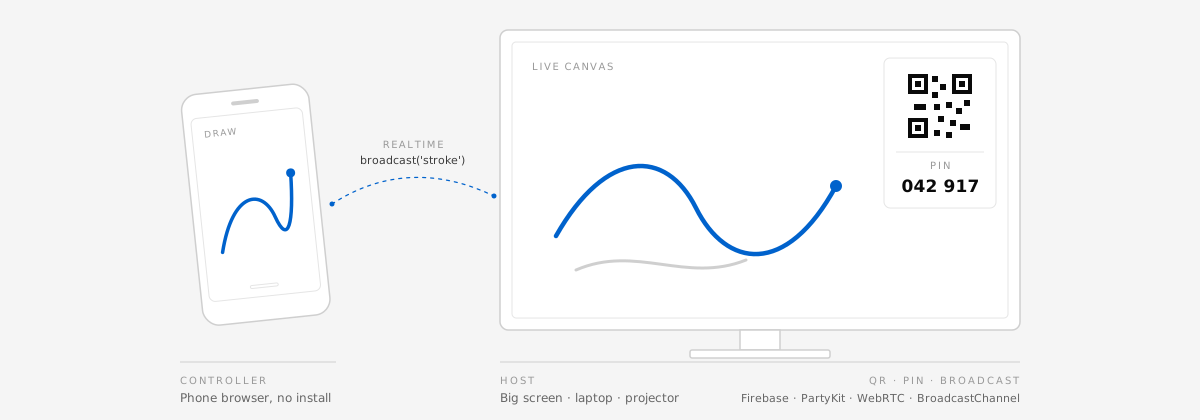
Phone as controller. Big screen as host.
Build multi-screen interactive web experiences. People pair by scanning a QR code, typing a 6-digit PIN, or (experimentally) hearing an ultrasonic chirp in the browser they already have, and every device in the room shares live input and state. Nothing to install.
01What it is
You bring the product: a quiz, a drawing wall, a game, a light show, a showroom. snap-pair handles pairing, the realtime transport and the phone-side details that are easy to get wrong.
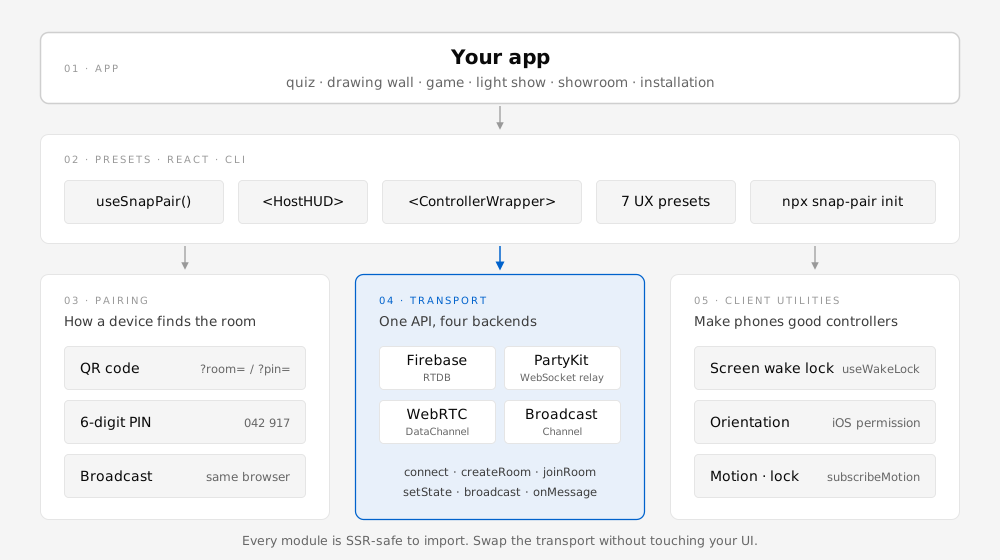
How a device finds the room: a QR code that carries the join URL, a 6-digit PIN, a look-alike-free room code, local broadcast between tabs, or experimental ultrasonic sound (Proximity).
One Transport API with four backends: Firebase Realtime Database, PartyKit, WebRTC DataChannel and BroadcastChannel. Switch with one line.
Make phones good controllers: screen wake lock, device orientation and motion (including the iOS permission prompt) and screen orientation lock.
02Quick start
Scaffold a new app with the wizard, or add the library to an existing React app.
npx snap-pair init
# non-interactive (CI, AI agents)
npx snap-pair init --yes --preset room-quiz-poll --out my-quiz
The wizard asks a few questions (in English or Japanese), writes snap-pair.config.json and scaffolds a runnable Vite + React template for the preset.
npm i snap-pair-corepnpm add snap-pair-coreyarn add snap-pair-corebun add snap-pair-corePeer: react 18.2+. Optional: qrcode (QR in HostHUD), partysocket (sturdier PartyKit socket), react-dom (templates only).
Two tabs in the same browser, paired with a PIN. Swap in PartyKitTransport (or WebRTCTransport) and the same code works across the internet. FirebaseTransport shares room state but has no ephemeral messaging, so broadcast is not available there.
import { BroadcastChannelTransport } from 'snap-pair-core';

// Tab 1: the host (big screen)
const host = new BroadcastChannelTransport({ pairing: 'pin' });
await host.connect();
const { pairing } = await host.createRoom({ initialState: { strokes: [] } });
console.log('PIN', pairing.pin); // e.g. '042917'
host.onMessage((m) => draw(m.payload)); // m.type === 'stroke'

// Tab 2: the controller
const ctrl = new BroadcastChannelTransport({ pairing: 'pin' });
await ctrl.connect();
await ctrl.joinRoom('042917');
await ctrl.broadcast('stroke', { x: 0.42, y: 0.17 });03How devices connect
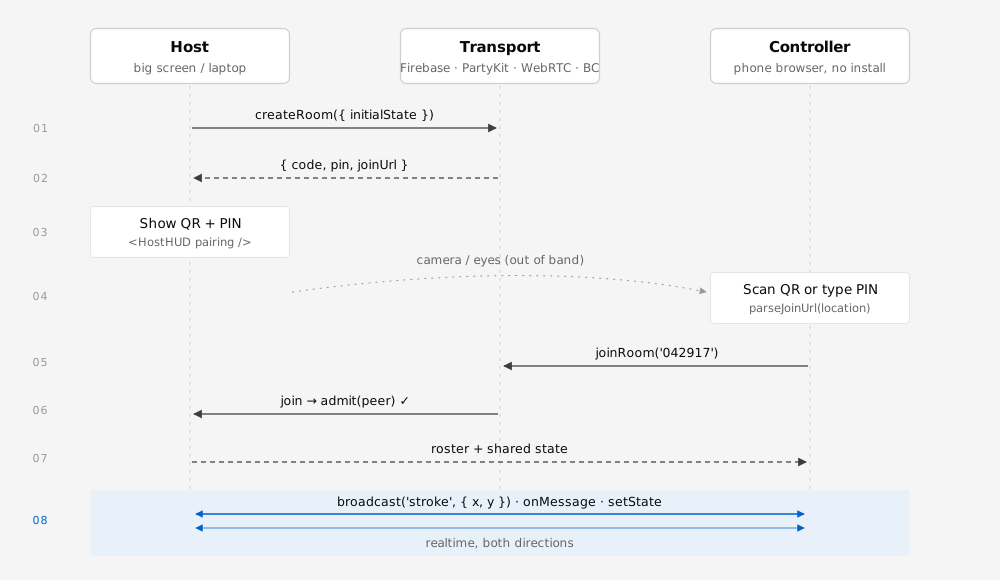
The host creates a room and shows how to join. Guests use the camera or a keyboard. Then messages flow both ways in realtime.
The URL carries ?room= or ?pin=. Works with every transport.
useQrRendererparseJoinUrl
Easy to read aloud. Full-width digits and dashes are normalized. PartyKit, WebRTC, BroadcastChannel.
generatePinverifyPin
Six characters like ABC 234, with no look-alike characters. Firebase's default.
generateRoomCode
Open another tab or window on the same machine. No network involved.
BroadcastChannelTransport
Experimental. The host emits an inaudible ~18–20 kHz tone; a nearby phone listens on the mic and joins. Needs mic permission; noisy rooms and some browsers are unreliable. QR and PIN stay primary.
useSoundPairingencodeSoundToken
Sound pairing limitations: ambient noise, microphone permission, and uneven browser support (Chrome/Edge best). The tone is not a secret — use admit for gated rooms.
import { HostHUD, useQrRenderer } from 'snap-pair-core';

const renderQr = useQrRenderer(); // undefined without `qrcode`: the HUD shows the code only
<HostHUD pairing={pairing} renderQr={renderQr} peerCount={peers.length} status={status} />04Transports
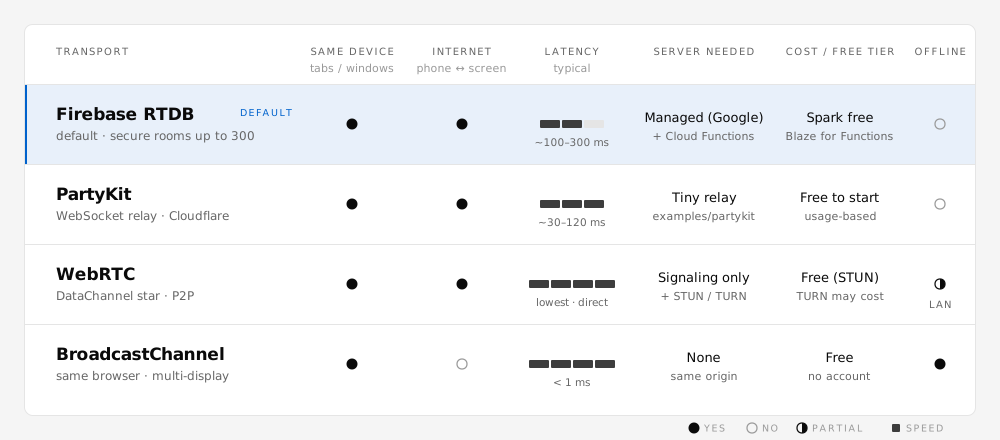
All four implement the same Transport interface, so switching is a one-line change. Check transport.capabilities when your UI needs to degrade gracefully.
The default for useSnapPair. Firebase Auth identifies each browser, Cloud Functions create rooms and admit guests, and RTDB rules limit what members can write. Rooms of up to 300. It shares state only: there is no ephemeral messaging (capabilities.messaging === false), so none of the presets runs on it. The CLI offers a config-only Firebase app, or Firebase plus PartyKit for a preset's realtime messages.
import { FirebaseTransport } from 'snap-pair-core';
import { getAuth } from 'firebase/auth';
import { getDatabase } from 'firebase/database';
import { getFunctions } from 'firebase/functions';

const fb = new FirebaseTransport({
  db: getDatabase(), auth: getAuth(), functions: getFunctions(),
  maxPlayers: 300,
});
await fb.connect();
const { pairing } = await fb.createRoom({ initialState: { turn: 0 } });
await fb.setState({ turn: 1 }); // replaces the whole state; send/broadcast are rejected
A tiny WebSocket relay you deploy from examples/partykit/. The host's browser owns the room; the relay only moves frames. Room keys are hashed, so raw PINs never reach the relay.
admitimport { PartyKitTransport } from 'snap-pair-core';
import PartySocket from 'partysocket'; // optional
const party = new PartyKitTransport({
host: 'my-relay.me.partykit.dev',
pairing: 'pin',
socketFactory: (p) => new PartySocket(p),
admit: (peer) => peer.name.length > 0,
});Peer-to-peer DataChannels in a star around the host. Signaling (offer, answer, ICE) rides on any transport with messaging, typically PartyKit. Then room traffic goes directly between devices. Guests recover on their own (ICE restart, then re-offers with backoff), and frames over 16 KiB are chunked (up to 1 MiB).
admitimport { PartyKitTransport, WebRTCTransport } from 'snap-pair-core';
const signaling = new PartyKitTransport({ host: 'my-relay.me.partykit.dev', pairing: 'pin' });
const p2p = new WebRTCTransport({
signaling,
iceServers: [{ urls: 'stun:stun.l.google.com:19302' }],
reconnect: { maxAttempts: 5 }, // default; false turns recovery off
});
p2p.onMessage((m) => console.log(m.type, m.payload, m.from));Tabs and windows of the same browser profile and origin talk directly. No network, no server, no account. Ideal for multi-display installations, kiosks and prototyping.
import { BroadcastChannelTransport, isBroadcastChannelSupported } from 'snap-pair-core';

if (isBroadcastChannelSupported()) {
  const local = new BroadcastChannelTransport({ pairing: 'pin', maxPlayers: 4 });
  await local.connect();
  const { pairing } = await local.createRoom({ initialState: { scene: 0 } });
  local.onState((s) => render(s));
}
05Presets
Each preset ships as a runnable template with a recommended transport, message shapes and a rate limit (all in PRESETS). None runs on Firebase, which has no ephemeral messaging. Select a preset to see the core of its message flow.
// Controller: batch normalized points every 33 ms (≤30 msg/s, ≤64 points), addressed to the host
pad.addEventListener('pointermove', (e) => points.push([e.offsetX / w, e.offsetY / h]));
setInterval(() => {
  if (!points.length) return;
  const to = transport.room.hostId;
  transport.send({ type: 'stroke', payload: { id, color, width: 4, points: points.splice(0, 64) }, to });
}, 33);

// Host: draw every peer's strokes (clamp points to 0..1 first)
transport.onMessage((m) => m.type === 'stroke' && drawPath(m.from, m.payload));// Controller: a tap or a swipe becomes a burst (throttled to ≤10 msg/s)
pad.addEventListener('pointerup', throttle((e) => {
const power = swipePower(e); // 0..1
transport.send({ type: 'blast', payload: { x: e.offsetX / w, y: e.offsetY / h, power, hue }, to: transport.room.hostId });
}, 100));
// Host: spawn particles on the big canvas
transport.onMessage((m) => m.type === 'blast' && emitter.burst(m.payload, m.from));// Controller: type a short message, flick it to throw (≤2 msg/s)
form.onsubmit = (e) => {
e.preventDefault();
const { vx, vy } = lastFlick;
transport.send({ type: 'throw', payload: { text: input.value.slice(0, 40), vx, vy, color }, to: transport.room.hostId });
input.value = '';
};
// Host: messages fly onto the wall (validate and limit length on the host too)
transport.onMessage((m) => m.type === 'throw' && wall.add(sanitize(m.payload.text), m.payload));// PartyKit + PIN: the host owns the state, phones only send votes
const [party] = useState(() => new PartyKitTransport({ host, pairing: 'pin', maxPlayers: 300, allowGuestState: false }));
const { room, createRoom, updateState } = useSnapPair({ transport: party, guest: { id: '', name } });
// Phone: vote once for the current question
party.send({ type: 'vote', payload: { questionId: room.state.questionId, choice: 2 }, to: room.hostId });
// Host: keep the latest vote per peer, publish the tally at most 4×/s
party.onMessage((m) => m.type === 'vote' && votes.set(m.from, m.payload.choice));
publishTally(() => updateState({ ...room.state, tally: countVotes(votes) }));// Controller: send d-pad + buttons only when they change (≤60 msg/s)
let seq = 0, last = '';
function onInput({ x, y, buttons } /* x, y: -1 | 0 | 1; buttons: A = 1, B = 2 */) {
const key = `${x},${y},${buttons}`;
if (key === last) return;
last = key;
transport.send({ type: 'input', payload: { seq: ++seq, x, y, buttons }, to: room.hostId });
}
// Host: one player per peer id; drop out-of-order input by seq
transport.onMessage((m) => m.type === 'input' && players.get(m.from)?.setInput(m.payload));import { ControllerWrapper, subscribeOrientation } from 'snap-pair-core';
// Controller: ControllerWrapper shows the iOS permission button and keeps the screen on
<ControllerWrapper transport={transport} motion wakeLock orientation="portrait">
{({ motionPermission }) => motionPermission === 'granted' && <Tilt />}
</ControllerWrapper>;
// Inside <Tilt />: stream orientation, throttled to ≤30 msg/s
subscribeOrientation(throttle(({ beta, gamma }) =>
transport.send({ type: 'motion', payload: { beta, gamma, shake: 0 }, to: transport.room.hostId }), 33));
// Host: steer the scene
transport.onMessage((m) => m.type === 'motion' && ship(m.from).steer(m.payload));import { BroadcastChannelTransport } from 'snap-pair-core';
// Every window joins the same local room; the first one hosts
const t = new BroadcastChannelTransport({ pairing: 'code' });
await t.connect();
// Each window announces itself and picks its slice of the scene
await t.broadcast('hello', { id: t.peerId, index });
// Leader window: a clock so every window renders the same frame (≤60 msg/s)
setInterval(() => t.broadcast('tick', { t: performance.now(), scene }), 1000 / 60);
// Display windows: render their slice
t.onMessage((m) => m.type === 'tick' && renderSlice(m.payload, index));06CLI
npx snap-pair init: four ways inThe wizard speaks English or Japanese (from LANG / LC_ALL, or --lang en|ja). Pick whichever path matches how you think about the project (--path skips the menu). Every path writes snap-pair.config.json and scaffolds a Vite + React template, plus a PartyKit relay when the transport needs one.
Choose one of the 7 presets, then one of the transports it supports (recommended first). --path ux
Same device, realtime, P2P, or managed? You get a transport, then the presets that fit it. --path architecture
Start from what you already have: Firebase, Cloudflare/PartyKit, or no backend. Firebase offers a config-only app, or Firebase plus PartyKit for a preset's realtime messages. --path stack
Write a sentence in English or Japanese, like "audience votes on a stage screen". A rule-based recommender suggests a preset, transport and pairing you can accept or adjust. --path consult
$ npx snap-pair init --out my-quiz
snap-pair init: set up a multi-device experience

How do you want to choose?
  1) By experience: pick one of 7 presets (default)
  2) By architecture: same device, realtime, P2P, or managed
  3) By stack: Firebase, Cloudflare/PartyKit, or no backend
  4) Describe your idea and get a recommendation
Choose 1-4 [1]: 1

Which experience?
  1) Stroke Stream (stroke-stream)
       Transports: webrtc*, partykit, broadcast · Pairing: qr, code, pin
  …
  4) Room Quiz / Poll (room-quiz-poll) (default)
       The host shows a question; everyone in the room answers on their phone and the tally updates live.
       Transports: partykit*, broadcast, webrtc · Pairing: pin, qr, code
       Messages: vote · Rate limit: ≤1/s (once)
  …
Choose 1-7 [4]: 4

Which transport?
  1) PartyKit (Cloudflare relay) (recommended, default)
       + Works across networks and NATs (it is a server)
       - One relay hop of latency (usually 20–80 ms)
       $ Cost: Cloudflare has a free tier …
  2) BroadcastChannel (same device)
  3) WebRTC DataChannel (P2P)
Choose 1-3 [1]: 1

How do guests join?
  1) Numeric PIN (recommended, default)
  2) QR code
  3) Room code
Choose 1-3 [1]: 1

Summary:
  Preset: Room Quiz / Poll (room-quiz-poll)
  Transport: PartyKit (Cloudflare relay)
  Pairing: Numeric PIN
  Cost: Cloudflare has a free tier …
Wrote my-quiz/snap-pair.config.json
Scaffolded the room-quiz-poll template into my-quiz

Next steps:
  1. cd my-quiz && npm install
  2. Local relay: npx partykit dev party/server.ts (port 1999) in another terminal
  3. npm run dev, open the URL on the big screen (host), and scan the QR code with a phone
  …
Real output of snap-pair init (English), shortened where marked with …. With --lang ja every prompt is in Japanese.
npx snap-pair init --yes --preset room-quiz-poll --out my-quiz
npx snap-pair init --yes --preset virtual-controller --transport webrtc --json   # JSON on stdout: config, files, nextSteps
npx snap-pair init --yes --architecture managed --no-scaffold                    # Firebase config only (preset: null)
npx snap-pair init --yes --stack firebase --preset type-throw                    # Firebase app + PartyKit for the preset
npx snap-pair presets --json                                                     # the preset registry
npx snap-pair recommend "a tilt racing game for 4 friends"                       # → motion-sensor over WebRTC, QR
Flags: --path, --preset <id|none>, --transport broadcast|partykit|webrtc|firebase, --pairing qr|code|pin|broadcast, --architecture same-device|realtime|p2p|managed, --stack firebase|cloudflare|none, --describe, --out, --partykit-host, --max-players, --no-scaffold, --force, -y, --yes, --json, --lang en|ja. --transport firebase with a preset is rejected: no preset fits Firebase.
07API
Everything is exported from snap-pair-core. Transports, pairing helpers and client utilities are plain TypeScript; only the hooks and components need React.
useSnapPairimport { useState } from 'react';
import { PartyKitTransport, useSnapPair } from 'snap-pair-core';
// Firebase (default): server-assisted rooms
const sp = useSnapPair({ db, auth, functions, guest: { id: '', name: 'Ada' }, maxPlayers: 8 });
// Any other transport: an instance (you own it) or a factory (the hook owns it)
const [party] = useState(() => new PartyKitTransport({ host: 'my-relay.me.partykit.dev', pairing: 'pin' }));
const sp = useSnapPair({ transport: party, guest: { id: '', name: 'Ada' } });
const { room, authReady, createRoom, joinRoom, updateState, updateOwnPlayer, updateRoomStatus, leaveRoom } = sp;Both modes return the same shape. With a transport, authReady follows the connection and localGuest.id becomes the peer id; use the instance's send / broadcast / onMessage for ephemeral input. A factory (transport: () => new X()) is disconnected on unmount.
| Path | Contents |
|---|---|
snap-pair-core | Everything: transports, pairing, client utilities, components, presets, i18n (ESM + CJS, typed) |
snap-pair-core/hooks/useSnapPair | useSnapPair only; the old snap-pair-core/src/hooks/useSnapPair path still works |
snap-pair-core/transports/* | base, firebase, partykit, webrtc, broadcast; same classes as the root |
snap-pair-core/config.schema.json | JSON Schema for snap-pair.config.json |
npx snap-pair | The CLI (bin): init, presets, recommend |
| Export | Notes |
|---|---|
Transport | Abstract base: connect, rooms, state, send/broadcast, on* subscriptions, capabilities |
FirebaseTransport | RTDB + callable Cloud Functions; server-authoritative joins |
PartyKitTransport | host, party, socketFactory; WebSocket fallback with backoff |
WebRTCTransport | signaling, iceServers, reconnect, maxMessageBytes; DataChannel star with auto-reconnect and chunking |
BroadcastChannelTransport | Same-origin tabs and windows |
RelayTransport | Shared engine: pairing, maxPlayers, admit, namespace, heartbeats |
| Export | Notes |
|---|---|
generatePin verifyPin | Uniform 6-digit PINs; constant-time compare; normalizePin, isValidPin, formatPin |
deriveRoomId | Hashes a code or PIN into a namespaced room key (works on plain-HTTP LAN too) |
buildPairingJoinUrl parseJoinUrl | ?pin= / ?room= join links |
useQrRenderer | QR rendering via the optional qrcode package; also toQrDataUrl |
generateRoomCode | 6-character room codes without look-alike characters |
| Export | Notes |
|---|---|
useWakeLock | Keeps the controller screen on; re-acquires on visibility change |
requestOrientationPermission | iOS 13+ prompt from a tap; resolves granted / denied / unsupported |
subscribeOrientation subscribeMotion | Orientation angles and acceleration readings |
lockScreenOrientation | Screen orientation lock where supported |
| Export | Notes |
|---|---|
HostHUD | QR, room code, PIN, copyable join link, peer count, status; locale en/ja/auto, every label overridable |
ControllerWrapper | Phone-side shell: status bar, reconnect banner (onReconnect), wake lock, iOS motion button (motion), fullscreen + orientation lock. Props: transport or status, roomCode, locale, labels; children may be a function of { status, motionPermission } |
Full reference and the Firebase data layout: README on GitHub.
08For everyone
For people who run events, venues, classes, streams, showrooms or exhibitions and want the audience to join with their own phones. These are separate paths, not steps.
Open the live demo in two tabs. Nothing to install, no account, no card. For two phones, try snap-pair-lite.html.
No download needed. Paste the prompt below into Claude Code, Cursor, Codex, Gemini CLI or a similar tool. The only manual step is a one-time Firebase sign-in click.
Clone the repository, run npm install and npm test, then read the API overview and the design notes in docs/.
Fetch https://raw.githubusercontent.com/takaoumehara/snap-pair-skill/main/SKILL.md
and use it as your build instructions.

Connect these two MCP servers if they aren't connected yet:
- firebase: npx -y firebase-tools@latest mcp
- snap-pair-provisioner: npx -y snap-pair-provisioner

Then help me build: [describe what you want, e.g. "a live quiz game where
guests join by QR code and answer on their phones"].| Goal | Use | Credit card? | Others join by URL? |
|---|---|---|---|
| Learn, experiment, let a child build | Firebase Emulator | No | No, local only |
| Free public demo, small groups | Spark + Lite mode | No | Yes, up to 100 connections |
| Real guests, server-checked rooms | Blaze plan | Yes | Yes |
PartyKit, WebRTC and BroadcastChannel don't need Firebase at all. On Blaze, always set a budget alert.
09Security model
Auth identifies each browser, Cloud Functions admit participants, and RTDB rules let only members update narrowly scoped fields. Roles, membership, capacity and codes stay server-only.
With PartyKit, WebRTC and BroadcastChannel the host's browser owns the roster and state. Gate entry with admit(peer) and maxPlayers. Room keys are hashed and namespaced.
A 6-digit PIN has 10⁶ values. Rate-limit your public relay, validate payloads, throttle writes, and keep payments in a separate trusted server.
10FAQ
npx snap-pair init (or npx snap-pair recommend "your idea") and let the CLI decide.maxPlayers and the host browser. WebRTC's star topology suits small groups best.requestOrientationPermission() from a click handler, or use ControllerWrapper, which adds the button for you.window, document or navigator at import time. Create transports inside effects or client components.11Roadmap
Transport abstraction, FirebaseTransport, HostHUDnpx snap-pair init (4 paths, en/ja) with presets and recommend, 7 preset templates, ControllerWrapper, useSnapPair({ transport }), i18n, ESM/CJS build with an exports map, WebRTC auto-reconnect and chunkingbufferedAmount), mesh topology, host migration, real-browser e2e testsuseSnapPair imports firebase/auth statically; a Firebase-free hook entry or lazy loading